> For the complete documentation index, see [llms.txt](https://book.rochat.ai/rochat_book_en/llms.txt). Markdown versions of documentation pages are available by appending `.md` to page URLs; this page is available as [Markdown](https://book.rochat.ai/rochat_book_en/how-to-create-a-game-in-rochat-ai-avg.md).
# How to Create a Game in Rochat - AI AVG
We are still exploring Rochat Game - AI AVG (AI Generated Adventure Game) with you, and this guide will be updated over time.
## **AI Write**
Here, you can provide the AI with your ideas about the game's creation, including a brief description of the type, worldview, and the role and main objectives of {user} in this story.
**Example:** "This is a game about Loki set in the Marvel Universe. Main objective: save Earth from an alien invasion. Loki doesn't want to save anyone, {user} has superpowers." This is enough for the AI to create a plot and scene without specific requirements.
However, if you want the game's plot to be specific, your descriptions should be as detailed as possible.
**Example:** "Please write the exact plot of 'Sherlock: The Blind Banker' episode." With this prompt, the AI will generate an accurate copy of that episode.
But sometimes you might find the AI-generated content isn't the best or most interesting. How do you change that? By providing richer and more precise prompts.
**Example:** "Please write the exact plot of 'Sherlock: The Blind Banker' episode. The game starts at the bank, where Sherlock, John, and {user} are examining a symbol portrait. After visiting Van Coon's apartment, they find him dead. Next, at the circus, they observe acrobats and start suspecting them as part of the Black Lotus group. They then try to decipher the code at 221B Baker Street. The whole story ends with the kidnapping of {user}."
AI will understand this prompt and create more detailed game content based on the provided details.
## **Game Protagonist**
Here, you can choose any character from your library or public characters created by others. In the game, the AI will refine the protagonist's identity and personality information for the character's setting.
## **Game Background**
You can also edit according to your ideas.
You can use {char} and {user} in the game background, where {char} represents the game protagonist and {user} represents the game player. Usually, using {char} and {user} instead of personal pronouns makes it easier for the AI to understand character settings and relationships.
Here are two tips:
The game background can correspond to the game scenes and mission objectives, which helps the AI better understand the complete game setting.
* If you create less popular or lesser-known content, you can use prompts in the game background to help the AI better understand your intentions:
* World Setting, Locations, characters, legends, stories, powers, skills, abilities, plots, battles, and events can be freely and creatively taken from "Sherlock Holmes."
* If you want the game to progress in a specific direction, you need to modify all the content generated by the AI for you.
* including the title, theme, tone, story overview, final goal, world description, and the relationship between {char} and {user}. Provide as many details as possible, such as: hierarchy, who holds power, who doesn't? What is the current situation? Is there a war going on? Is it peaceful? Finally, what does this place look like? Is it a dry wasteland, a city, or the underworld? Describe this in some detail.
## Task Objectives
The best practices for mission objectives are:
* The objective statement needs to correspond with the final scene.
* The objective statement needs to correspond with the success and failure values.
For example:
The main goal of the game is for {user} to uncover the hidden secrets in an ancient haunted manor. {user} needs to explore various rooms in the manor, solve puzzles, collect clues, and ultimately lift the curse of the manor.
## Numeric System Settings
* The value types include progress values, success values, and failure values.
* A game setting should not have several values with the same name.
* You need to clearly describe the rules for value changes in the value system.
* Values must be integers.
* The value system must have and only one success value, which will be displayed as progress in the game and directly determine the completion status of the game mission.
* The final value of the success value must always be greater than the initial value. It is recommended that the final value be 100, and the initial value be 0.
* The value system must have at least one failure value, without which the game will fail.
You can also use ">" and "<" to create value conditions.
For example:
> "If Health < 5, the game ends."
>
> "Every time {user} gets into a fight or gets injured, Health decreases by 10."
⚠ The game might increase or decrease values against the story development you set, and when you encounter this situation, it means you need to establish more rules.
For example:
* "Only obtaining a relic will increase Wealth."
* You can add specific number triggers, such as "If Wealth is high, it will more frequently trigger {char}'s protective instinct."
For decrease and increase, it is best to include reasons, such as:
* "If {user} is injured, Wealth decreases by 2 points. If {user} is healed, Wealth increases by 2 points."
### Example of Value System Settings
#### **Health**
* Initial Value: 100
* Final Value: 0 (The game ends when Health is 0)
* Rules: Every time {user} gets injured in battle or encounters a trap, Health decreases by 10 points. Every time the player finds medicine or rests, Health increases by 20 points.
#### **Progress**
* Initial Value: 0
* Final Value: 100 (The game is completed when it reaches 100)
* Rules: Every time {user} finds an important clue or solves a puzzle, Progress increases by 10 points.
#### **Fear**
* Initial Value: 0
* Final Value: 100 (The game fails when Fear reaches 100)
* Rules: Every time {user} encounters a terrifying event or enters a dangerous area, Fear increases by 20 points. Every time {user} finds a courage item or interacts with an NPC, Fear decreases by 10 points.
## Player Settings
The game will default to using the player's nickname instead of the default character.
You can create/edit three player characters, and players can choose from them. You can write distinctly different personalities for all three options, which will lead your story to develop in three different ways.
You can create "Good Guy," "Bad Guy," and "Coward" types. The game will create choices based on the personality chosen by the player.
For example, if you choose an impulsive or cold character at the start of the game, the available options might be wilder and might disregard morality. Conversely, if you choose a wise character, the available options will tend to emphasize kindness.
You can also specify the traits, equipment, and skills of your personality.
Players can choose from three different characters, each with different personalities, skills, and equipment. These characters are the "Good Guy," "Bad Guy," and "Coward." For example:
**Good Guy**
* Personality: Kind, brave, intelligent
* Skills: Healing (Restores 10 Health points every 10 minutes), Puzzle Expert (Progress increases by 15 points instead of 10 when solving puzzles)
* Equipment: First aid kit, adventure gear
**Bad Guy**
* Personality: Impulsive, ruthless, cunning
* Skills: Combat Master (Increases damage by 20 points in combat), Fear Manipulation (Fear value decrease rules change to Fear value increase)
* Equipment: Weapons, demolition tools
**Coward**
* Personality: Cowardly, cautious, witty
* Skills: Hide Master (Can avoid triggering a terrifying event once), Escape Expert (Fear value decreases by 20 points each time an escape is successful)
* Equipment: Invisibility cloak, escape tools
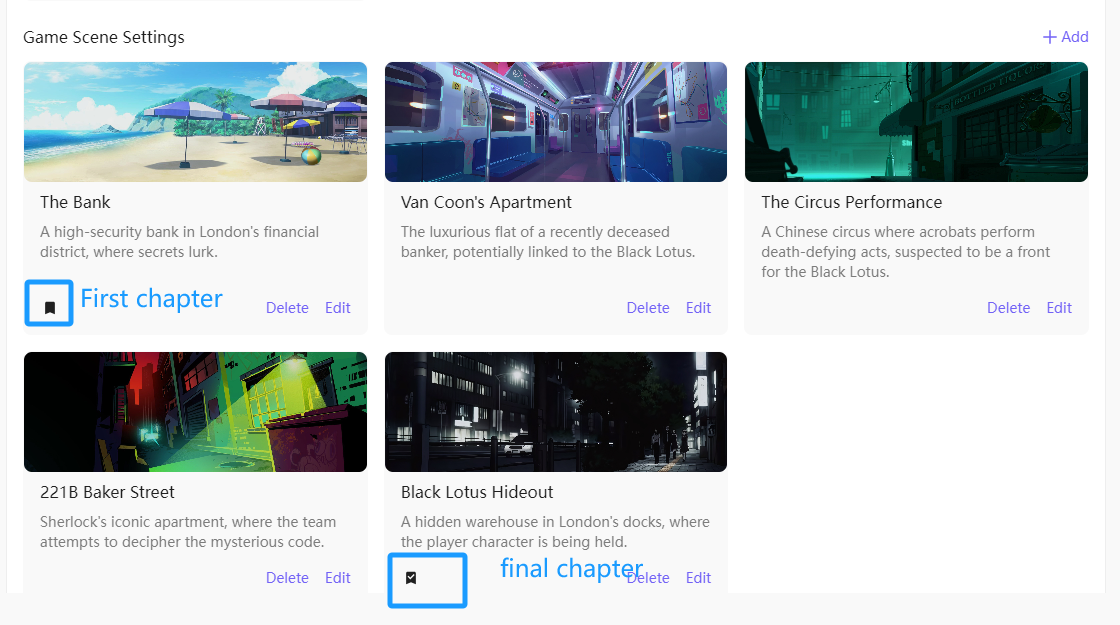
## Game Scene Settings
* Each scene should have a unique name and be designed to fit within the game's world, with interconnected backstories for a seamless gameplay experience. Scene descriptions can include specific rules for character behavior.
* Each scene has a unique name and detailed description to trigger specific events and behavior rules.
Here are some examples:
**Scene Names**
* Hall
* Library
* Basement
* Garden
* Master Bedroom
**Scene Descriptions**
Each scene description should contain specific details and rules. For example:
* **Hall**: A spacious hall adorned with ancient paintings, with a worn-out carpet on the floor. Players can find a hidden staircase here.
* **Basement**: A dark, damp basement filled with old furniture and clutter, with a musty smell in the air. There is a locked chest here, and players need to find the key to open it.
**Numerical Trigger Rules**
Each scene should include specific numerical trigger rules to ensure game progression and logic. For example:
* If health is below 20, players will encounter additional enemies upon entering the basement.
* If progress is above 50, players can find a useful book in the library that increases the progress value by 20 points.
**Scene Types**
* **First chapter**
First chapter is the opening of the game, containing the story's beginning and player choices. For example:
**Story Start**:
The player has just entered the manor, it's late, and the surroundings are silent. Suddenly, the door closes behind them. The player needs to find the exit of the manor and uncover its secrets.
**Player Choices**:
* Explore the hall
* Go to the library
* Check the basement entrance
**Process Chapters**
Process chapters contain various events and puzzles in the game. The order of these chapters can vary based on player choices.
**Final Chapter**
The final chapter is the game's conclusion, containing the goal and logic. For example:
**Numerical Trigger Rules**:
* If health is 0, the player dies, and the game ends.
* If progress reaches 100, the player successfully uncovers the manor's secret, and the game is won.
* If fear reaches 100, the player loses their sanity due to excessive fear, and the game is lost.
## Instructions (limited to 1500 token)
This section is where you can write all the "hidden" factors that players should not see. You have 1500 token to write all the game's secret commands.
You can include:
* Complete detailed settings of scenes and scene transitions
* Game objectives
* {char}'s behavior and manner of speaking
* NPC behavior and manner of speaking
* Hidden clues and values
* What {user} should and should not do
* Whether the game will end successfully, or the default situation will be a bad ending for everyone
* Interactions between game values
* Relationships and interactions between {char} and {user}
**Example:**
* **Detailed Plot**: {user} enters an old haunted manor and needs to uncover its secrets. The manor was left behind by an ancient family, filled with puzzles and traps. Each room has its own story and clues, which {user} needs to uncover one by one.
* **Game Objective**: The ultimate goal is to break the manor's curse, find the exit, and escape.
* **Main Character Behavior and Speaking Style**:
* Good guy: Kind, brave, rational, speaks gently, and encourages others.
* Bad guy: Impulsive, ruthless, cunning, speaks bluntly and threateningly.
* Coward: Cautious, timid, witty, speaks fearfully and often self-comforts.
* **NPC Behavior and Speaking Style**:
* Butler: Mysterious and calm, speaks vaguely and metaphorically.
* Maid: Friendly and helpful, speaks warmly and provides assistance.
* Ghost: Resentful and sorrowful, speaks eerily and with warnings.
* **Hidden Clues**:
* A hidden passage behind a painting in the hall.
* An old book in the library can trigger a hidden puzzle.
* A key hidden under the master bedroom's bed.
* Fear value increases whenever the player approaches a critical point.
* **What the Player Should and Should Not Do**:
* Should do: Explore each room, collect clues, and solve puzzles.
* Should not do: Ignore clues, avoid interacting with NPCs, and stay in one place for too long.
* **Game Endings**:
* Successful ending: Break the manor's curse, find the exit, and escape.
* Failed ending: Fear value reaches 100, {user} loses sanity due to excessive fear, and the game is lost.
* **Game Value Interactions**:
* Health and fear values interact; health decreases as fear increases.
* Progress value relates to health; solving puzzles increases progress and restores health.
* **Relationships and Interactions Between the Main Character and the Player**:
* Good guy: Maintains friendly interaction with {user}, providing help and support.
* Bad guy: Sometimes opposes {user}, potentially setting obstacles.
* Coward: Relies on {user}'s protection but also provides useful information.