> For the complete documentation index, see [llms.txt](https://book.rochat.ai/rochat_book_kor/llms.txt). Markdown versions of documentation pages are available by appending `.md` to page URLs; this page is available as [Markdown](https://book.rochat.ai/rochat_book_kor/rochat-2.md).
# Persona 만들고 바꾸기
Persona로 대화 속 내 인물을 설명하고, 채팅에서 선택해 일관된 정체성을 유지하세요.
다른 언어: [English](https://book.rochat.ai/rochat_book_en/how-to-create-persona-on-rochat) · [繁體中文](https://book.rochat.ai/rochat_book_zh/ru-he-zai-rochat-shang-wei-jue-se-she-zhi-shen-fen) · [日本語](https://book.rochat.ai/rochat_book_ja/rochatdekyarakutnoperusonawosuru) · [Español](https://book.rochat.ai/rochat_book_es/como-establecer-una-identidad-para-un-personaje-en-rochat) · [한국어](https://book.rochat.ai/rochat_book_kor/rochat-2)
Persona는 이름, 배경, 특징 등 **대화 속의 나**를 설명합니다. AI 캐릭터는 별도의 설정을 갖습니다. 다른 인물을 연기하고 싶다면 Persona를 나누어 사용하세요.
## 유용한 Persona 만들기
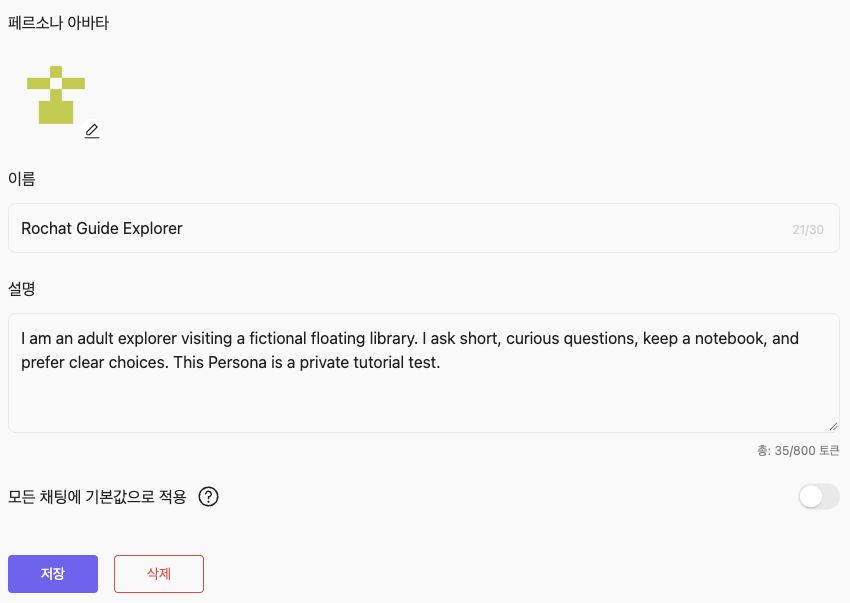
1. Web에서 계정의 **Persona** 설정을 여세요.
2. Persona를 만들고 선택 목록에서 알아보기 쉬운 이름을 붙이세요.
3. 캐릭터가 알았으면 하는 인물의 정보를 간결하게 쓰세요. 편집기의 토큰 카운터를 보며 계정에 표시된 한도를 지키세요.
4. 시각적 모습이 필요하면 이미지를 추가하세요. 이미지를 쓰는 기능은 추가 이미지 설정을 요구할 수 있습니다.
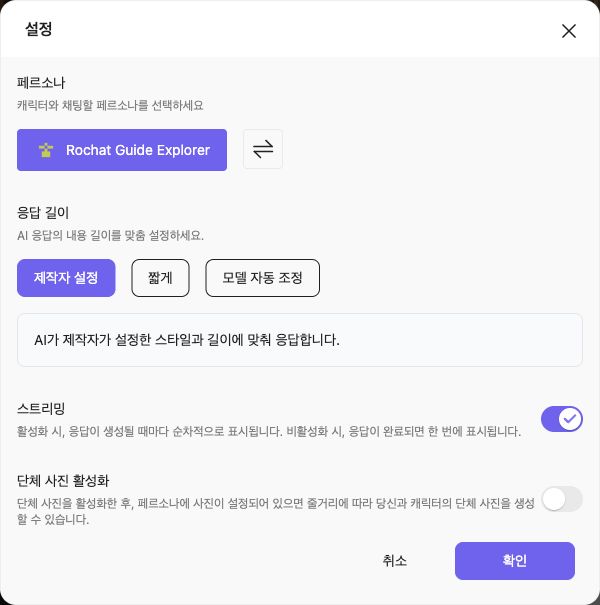
5. 저장 전에 **Apply as default**를 확인하세요. 특정 시나리오에만 쓸 Persona이고 기존 기본값을 유지하고 싶다면 꺼 두세요. 저장한 뒤 원하는 채팅을 열어 채팅 설정에서 Persona를 선택하세요. 계속하기 전에 선택된 이름을 확인하세요.
페르소나 이름과 설명을 입력하고 저장하기 전에 모든 채팅의 기본값 적용 여부를 확인하세요.
설명 예시:
> 로언은 등불 기록보관소를 방문한 성인 해안 지도 제작자다. 참을성이 있고 구체적으로 질문하며 낡은 수첩을 갖고 다닌다. 오늘 미라를 처음 만났으며 아직 기록보관소의 비밀 방에 대해서는 모른다.
캐릭터의 반응을 미리 쓰거나 줄거리 전체를 강요하지 않으면서 시작 관계를 정할 수 있습니다.
## 기본 인물과 개별 대화
보통 같은 인물로 시작하고 싶다면 기본 Persona를 사용하세요. 대화별 Persona 선택이 있다면 그 선택도 확인하세요. 계정 기본값을 바꿨다는 이유로 기존 대화도 바뀌었다고 생각하지 마세요.
확인하기 전에 이 대화에서 선택한 페르소나를 확인하세요.
Persona를 바꿔도 이미 나눈 대화는 지워지지 않습니다. 이전 인물이 대화나 저장된 Memory에 남아 있다면 관련 정보를 수정하거나, 별도의 대화에서 새로운 상황을 시작하세요.
## 정보를 알맞은 곳에 두기
변하지 않는 인물 정보는 Persona에 두세요. “내일 항구에서 만나기로 했다”는 현재 대화의 Memory에, 항구의 역사는 Lorebook에 두세요. 그러면 모든 Persona에 긴 세계 설명을 반복할 필요가 없습니다.
토큰은 글자 수나 단어 수와 다릅니다. 눈에 보이는 길이가 같은 설명도 언어에 따라 토큰 수가 달라질 수 있습니다. 저장에 실패하면 손으로 글자를 세지 말고 현재 편집기 카운터를 보며 줄이세요.
## 관련 가이드
[대화에서 Memory 사용하기](https://book.rochat.ai/rochat_book_kor/rochat/1/undefined-9) · [Lorebook, Memory, Persona의 차이](https://book.rochat.ai/rochat_book_kor/lorebook) · [제한, 이용 자격과 비용](https://book.rochat.ai/rochat_book_kor/limits-and-costs)
## Rochat에서 계속하기 (외부 사이트)
[Persona 설정 열기](https://rochat.ai/account/persona)
***
이전: [Web, iOS, Android에서 Rochat 사용하기](https://book.rochat.ai/rochat_book_kor/platforms) · 다음: [대화에서 Memory 사용하기](https://book.rochat.ai/rochat_book_kor/rochat/1/undefined-9)