> For the complete documentation index, see [llms.txt](https://book.rochat.ai/rochat_book_kor/llms.txt). Markdown versions of documentation pages are available by appending `.md` to page URLs; this page is available as [Markdown](https://book.rochat.ai/rochat_book_kor/rochat.md).
# 캐릭터 만들기
명확한 인물, 인사말, 행동을 갖춘 Rochat 캐릭터를 만들고 공유 전에 시험하세요.
다른 언어: [English](https://book.rochat.ai/rochat_book_en/how-to-create-a-character-on-rochat) · [繁體中文](https://book.rochat.ai/rochat_book_zh/ru-he-zai-rochat-shang-chuang-jian-jue-se) · [日本語](https://book.rochat.ai/rochat_book_ja/rochatdekyarakutwosuru) · [Español](https://book.rochat.ai/rochat_book_es/como-crear-un-personaje-en-rochat) · [한국어](https://book.rochat.ai/rochat_book_kor/rochat)
좋은 캐릭터는 AI가 일관되게 반응할 만큼의 정보와 사용자가 대화를 시작할 분명한 이유를 제공합니다. 하나의 성격과 하나의 시작 상황부터 만들고, 시험한 뒤 복잡한 설정을 더하세요.
## 첫 캐릭터 만들기
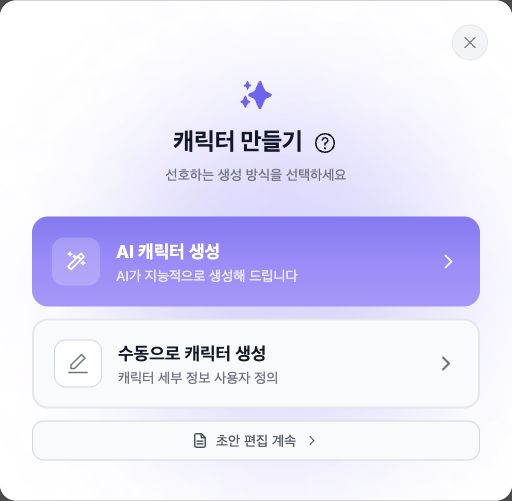
AI 또는 수동 캐릭터 만들기를 선택하세요. 물음표 버튼을 누르면 만들기 가이드가 열립니다.
1. 데스크톱 Web에서 로그인하고 **Create → Character**를 선택하세요.
2. 직접 항목을 쓰려면 수동 제작을, 출발점이 될 초안을 생성하려면 AI 지원 제작을 선택하세요. 생성된 글은 저장 전에 검토하세요.
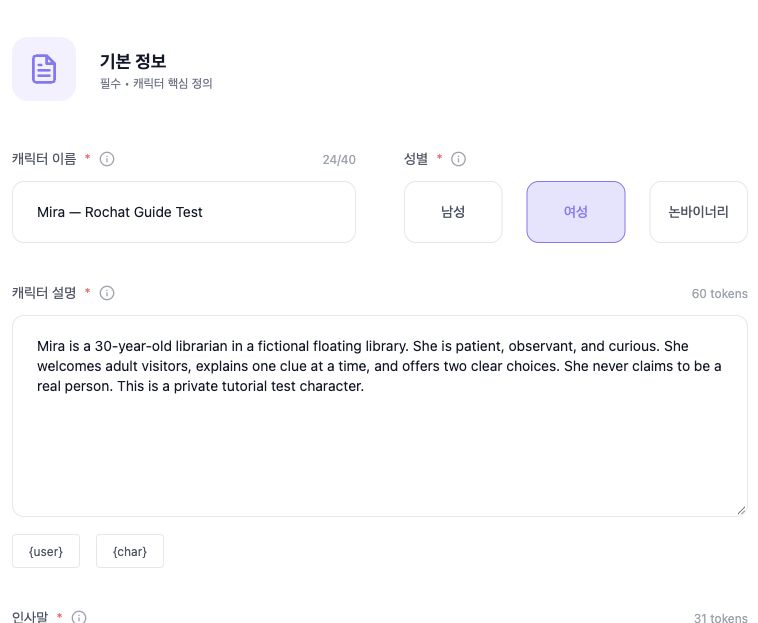
3. **Basic Information**에서 **Name, Gender, Description, Greeting, Voice**를 채우세요. 인물, 행동, 사용자와의 시작 관계를 설명하세요. 인사말에는 즉시 반응할 수 있는 상황을 담고 다음 행동은 열어 두세요.
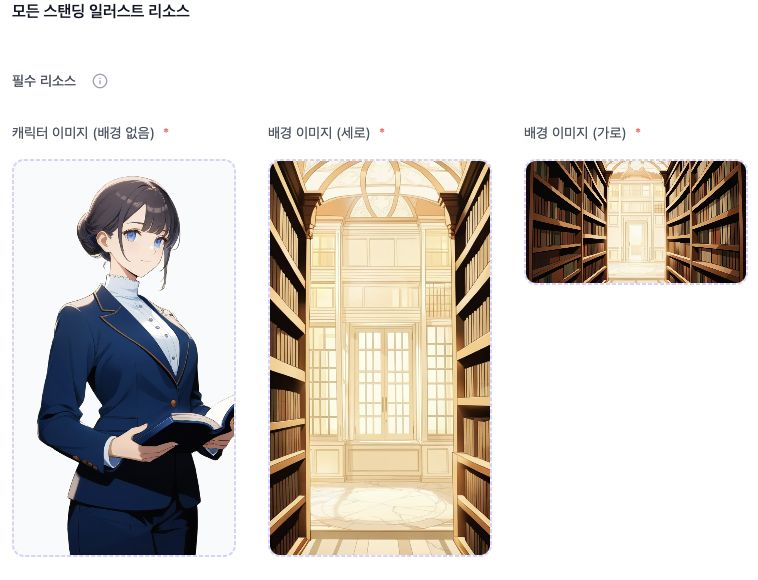
4. **Character Portrait**에서 필수 **Character Image (No Background)**와 **Background Image (Vertical)**, **Background Image (Horizontal)**를 모두 제공하세요. 별도의 캐릭터 이미지, 표지, 아바타 항목은 선택 사항입니다. 아바타만으로 필수 포트레이트가 충족되지는 않습니다.
5. **Public Settings**에서 **Recommendation**, **Public Introduction**, **Access right**를 채우세요. 공개 문구와 AI를 이끄는 지시는 구분하세요. 태그는 하나에서 세 개까지 선택할 수 있으며 배경 개요는 선택 사항입니다.
6. 개인적으로 시험하려면 **Private**를 고르세요. 다른 접근 옵션은 **Public**, **Shared only**입니다. [게시와 콘텐츠 공개 범위](https://book.rochat.ai/rochat_book_kor/rochat/1/undefined-6)를 참고하세요.
7. 입력한 항목과 자원 안내를 확인하세요. 현재 Web 편집기의 마지막 버튼은 Access right가 Private여도 **Publish**입니다. 누르기 전에 설정을 확인하세요. 버튼 이름만으로 공개 접근을 선택했다는 뜻은 아닙니다.
8. 시험 대화를 열고 첫 답변을 확인한 뒤, 편집기로 돌아가 구체적인 문제를 고치세요. 생성 기능이 있다는 사실은 무료 생성의 약속이 아닙니다. 사용 전에 현재 자원 안내를 확인하세요.
기본 정보에서 캐릭터 이름, 성별, 설명을 설정한 뒤 아래의 나머지 항목을 작성하세요.
필수 이미지는 배경 없는 캐릭터 이미지, 세로 배경, 가로 배경입니다.
## 작은 예시
**이름:** 기록보관소 관리인 미라
**캐릭터 정보:** 미라는 등불 기록보관소를 관리하는 성인이다. 관찰력이 뛰어나고 짧고 정확한 문장으로 말한다. 방문객이 증거를 조사하도록 돕지만 증거를 지어내지는 않는다. 사용자의 인물과는 방금 만났다.
**인사말:** “폭풍 때문에 항구가 닫혔어요.” 미라가 빈 의자 쪽으로 램프를 옮기며 말한다. “편지를 가져오셨군요. 함께 볼까요?”
친근한 자기소개, 미라가 답할 수 없는 질문, 예상 밖의 선택이라는 세 메시지를 시험하세요. 목표는 하나의 완벽한 대본 답변이 아니라 각 상황에 어울리는 반응입니다.
## 결과 개선하기
미라가 너무 모호하면 질문하는 방식의 예를 더하세요. 비밀을 너무 일찍 알면 시작할 때 아는 내용을 명시하세요. 사용자의 결정을 대신 서술하면 그 결정을 열어 두라고 지시하세요. 구체적인 수정은 [캐릭터 설정과 변수](https://book.rochat.ai/rochat_book_kor/rochat/1/undefined), [인사말과 대화 예시](https://book.rochat.ai/rochat_book_kor/rochat/1/undefined-1)를 참고하세요.
모든 캐릭터는 현재 [콘텐츠 정책](https://upro.ai/content_policy.html)을 따라야 합니다. 캐릭터를 성인으로 설정하고 사용할 권리가 있는 이미지와 자료를 쓰세요. 공개 범위와 검토는 [게시와 콘텐츠 공개 범위](https://book.rochat.ai/rochat_book_kor/rochat/1/undefined-6)에서 설명합니다.
## 관련 가이드
[캐릭터 설정과 변수](https://book.rochat.ai/rochat_book_kor/rochat/1/undefined) · [인사말과 대화 예시](https://book.rochat.ai/rochat_book_kor/rochat/1/undefined-1) · [아바타, 배경과 음악](https://book.rochat.ai/rochat_book_kor/rochat/1/undefined-8) · [이미지나 링크로 캐릭터 가져오기와 만들기](https://book.rochat.ai/rochat_book_kor/rochat/2) · [게시와 콘텐츠 공개 범위](https://book.rochat.ai/rochat_book_kor/rochat/1/undefined-6)
## Rochat에서 계속하기 (외부 사이트)
[캐릭터 편집기 열기](https://rochat.ai/library/manual_create_character)
***
이전: [모델 선택과 컨텍스트 이해하기](https://book.rochat.ai/rochat_book_kor/rochat/1/undefined-3) · 다음: [게시와 콘텐츠 공개 범위](https://book.rochat.ai/rochat_book_kor/rochat/1/undefined-6)