> For the complete documentation index, see [llms.txt](https://book.rochat.ai/rochat_book_en/llms.txt). Markdown versions of documentation pages are available by appending `.md` to page URLs; this page is available as [Markdown](https://book.rochat.ai/rochat_book_en/chat-controls.md).
# Chat controls
Use chat message controls deliberately, distinguish regenerating from editing, and protect the conversation you want to keep.
Read this guide in: [English](https://book.rochat.ai/rochat_book_en/chat-controls) · [繁體中文](https://book.rochat.ai/rochat_book_zh/chat-controls) · [日本語](https://book.rochat.ai/rochat_book_ja/chat-controls) · [Español](https://book.rochat.ai/rochat_book_es/chat-controls) · [한국어](https://book.rochat.ai/rochat_book_kor/chat-controls)
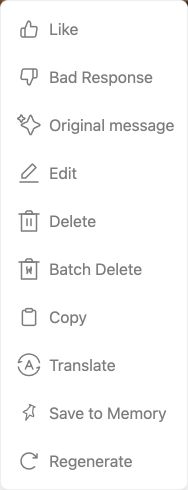
Message controls help you revise a conversation without rewriting the character's entire setup. Open a message's action menu to see which operations your platform and that message support.
Write your message, then use the send button on the right.
| Control, when available | Use it when… | Check first |
| ----------------------- | --------------------------------------------------- | --------------------------------------------------------- |
| Regenerate | You want another response to the same situation. | The selected model and any new charge. |
| Edit | A message needs a specific correction. | Whether you are changing your message or the character's. |
| Copy | You want to keep a text excerpt. | Whether it includes private information. |
| Delete | You intentionally want to remove content. | The confirmation and which messages are affected. |
| Save to Memory (Web) | A moment should remain useful in this conversation. | The conversation and Memory entitlement. |
| New conversation | You want a fresh starting situation. | That you are not trying to continue an existing thread. |
Open a message’s menu to see its available actions, including Save to Memory.
## Revise a reply with a purpose
Suppose Mira says the harbor is open, but the opening established a storm closure. A targeted correction is more useful than repeatedly regenerating without guidance: “The harbor is still closed. Let's inspect the map indoors.” If an editable message contains the wrong fact, correct that message using the available control and then review what follows.
Regeneration can produce a different answer, but it does not fix contradictory Persona, Memory or character instructions. If the same problem keeps returning, check those sources before generating again.
## Before destructive controls
Read the confirmation for deletion or restarting. Keep a local copy of any text you need. Do not assume deleted messages or restarted progress can be recovered, or that deleting a visible message deletes every kind of service data; privacy is covered in [Delete an account and understand privacy](https://book.rochat.ai/rochat_book_en/about-rochat/faq/account-faq).
If a button is missing, check the selected message, platform, version and account. See [Troubleshoot character chats](https://book.rochat.ai/rochat_book_en/about-rochat/faq/frequently-asked-questions) for a systematic troubleshooting sequence.
## Related guides
[Use Memory in your conversations](https://book.rochat.ai/rochat_book_en/how-to-create-a-character-on-rochat/create-character-method-1-custom-creation/auto-memory) · [Troubleshoot character chats](https://book.rochat.ai/rochat_book_en/about-rochat/faq/frequently-asked-questions) · [Delete an account and understand privacy](https://book.rochat.ai/rochat_book_en/about-rochat/faq/account-faq) · [Limits, entitlements and costs](https://book.rochat.ai/rochat_book_en/limits-and-costs)
## Continue in Rochat (external)
[Open your chats](https://rochat.ai/rochat)
***
Previous: [Find characters and creators](https://book.rochat.ai/rochat_book_en/discover) · Next: [Create images and group photos](https://book.rochat.ai/rochat_book_en/images-and-group-photos)